Built for emergencies.
Powered by people.
Skuark is a verified community alert and safety network built to help people feel safer, act faster and support one another responsibly when something happens nearby.
One tap. Three things happen at once.
Raise an alert in one tap
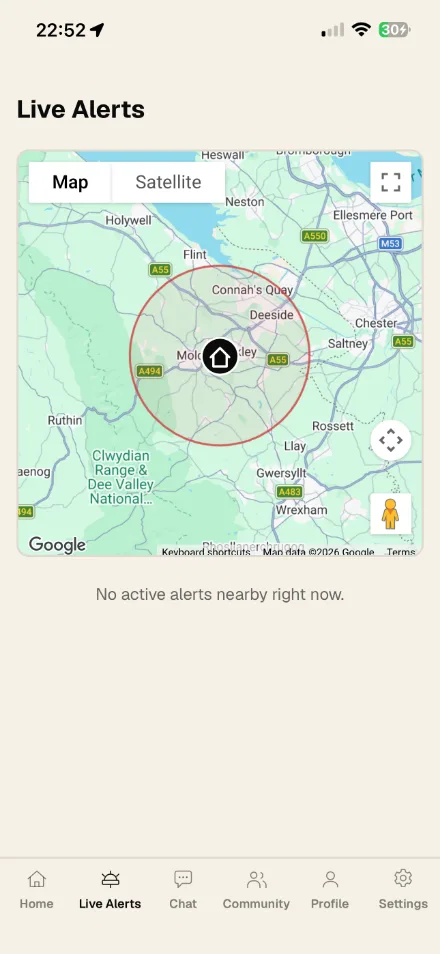
If you feel unsafe or witness an incident, one tap raises a local alert. Nearby verified members are notified instantly with your location.
Your community is notified
Verified users nearby — your neighbours as well as Qualified Responders — see the alert in real time and can come to help. If you choose, a live video and audio link lets them see the situation as they arrive.
Watch help arrive
See responders head toward you on the map with distance and ETA, while important evidence is captured. Close the alert yourself at any time — you're always in control.
One app, and the whole of it.
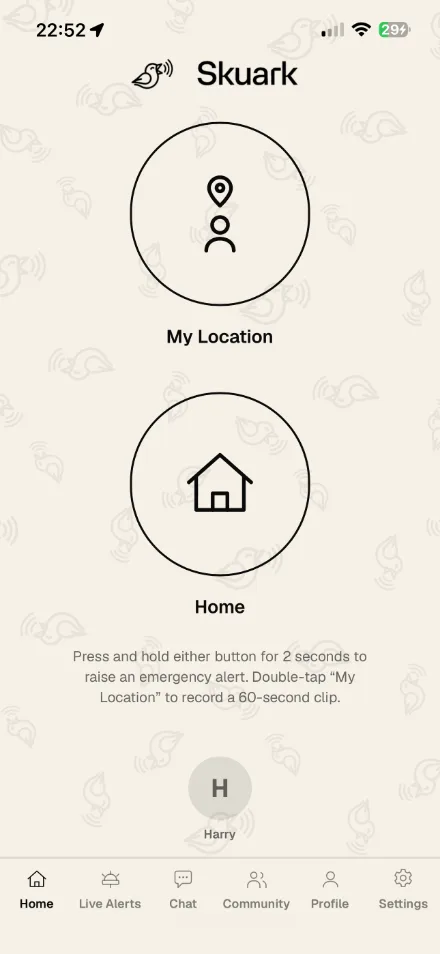
Alerts, your family, your community and the everyday things around them — on iPhone, Android and the web.
The clever bit.
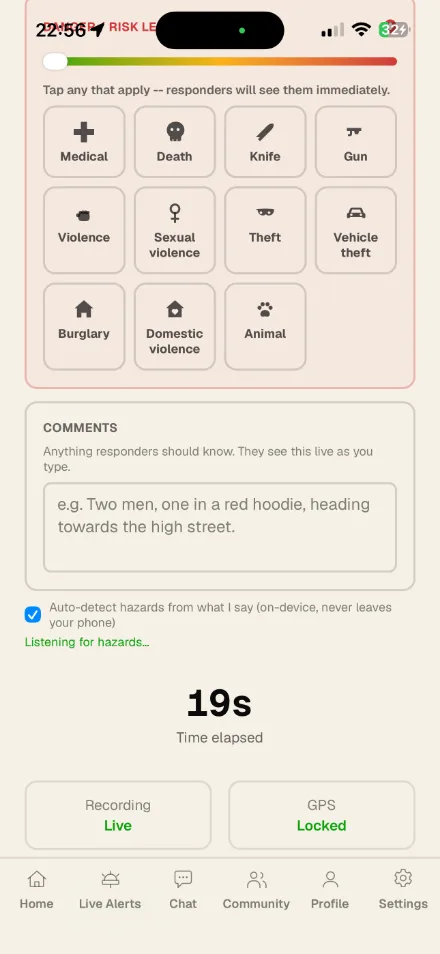
Raising the alert is one tap. What helps most comes in the thirty seconds after it — and all you have to do is talk.
Say what you would tell a 999 operator. What is happening, what the person looks like, which way they went, a registration if you can read one. You do not have to be calm, tidy or in order about it, and you never have to stop and type.
Your phone listens while the alert runs, and it does the listening itself. The audio never leaves the handset and no other company hears a second of it. What it picks out of your own words becomes tags and short lines the people coming to help can read at a glance.
-
Say it out loud
Describe it the way you would down the phone to a call handler. Correct yourself freely — if you say a gun and then see it is a knife, the app takes the first tag back rather than leaving a weapon on the alert that was never there.
-
Your phone does the thinking
Speech recognition runs on the handset, with no cloud service in the loop. What you say is matched against eleven hazard tags — knife, gun, violence, medical, burglary and the rest — and short details are lifted out: a registration, a vehicle, a person, an injury, a direction. It knows to ignore the obvious, too: “my phone battery is dying” flags nothing.
-
Responders get the useful part
The tags, those short lines and a danger level appear on the alert as you speak, so somebody two streets away knows what they are walking into. They get what is actionable, never a running transcript — and it is labelled as machine-heard, so nothing is mistaken for a detail you confirmed yourself.
And the record is kept
Everything said during the alert is collated in full and held against the incident — your device and any responder’s, each attributed, with later corrections marked. No screen in the app will show it back to you, and responders never see it at all. It reaches exactly two places: the evidence report you can download afterwards, alongside your video, and a Skuark reviewer looking into the incident. What was said in the worst minute of a bad day should not depend on anyone remembering it.
Everything you need when it matters most.
One-tap call to 999
Every live alert screen has a Call button that dials your local emergency number — 999, 911, 112, wherever you are — through your phone's own dialer, while your alert and livestream keep running.
Real-time local awareness
While an alert is active, your live location is shared with the verified people coming to help — and only then.
Live video & evidence capture
Optionally stream live video during an alert and capture secure clips — so vital evidence is preserved instead of lost in panic.
Verified members
Every alert comes from a verified user, and any member nearby can respond. Medical staff, police, fire service, security professionals and first aiders additionally carry a distinct Qualified Responder marker.
Family SOS
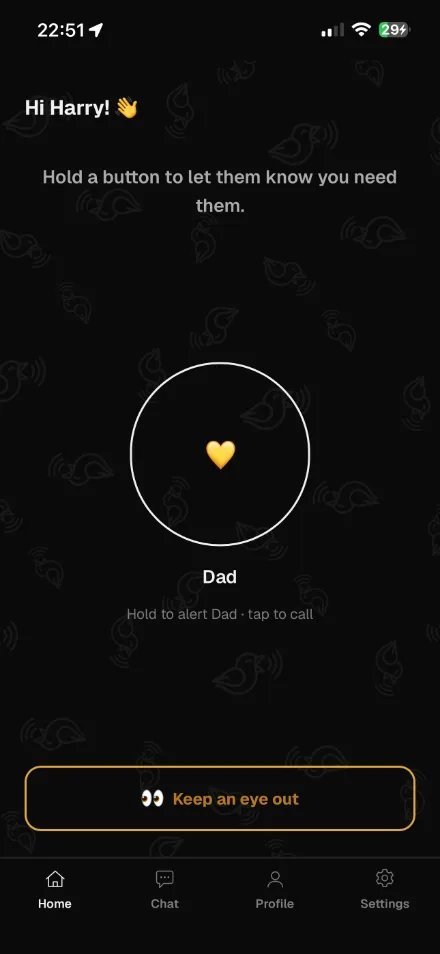
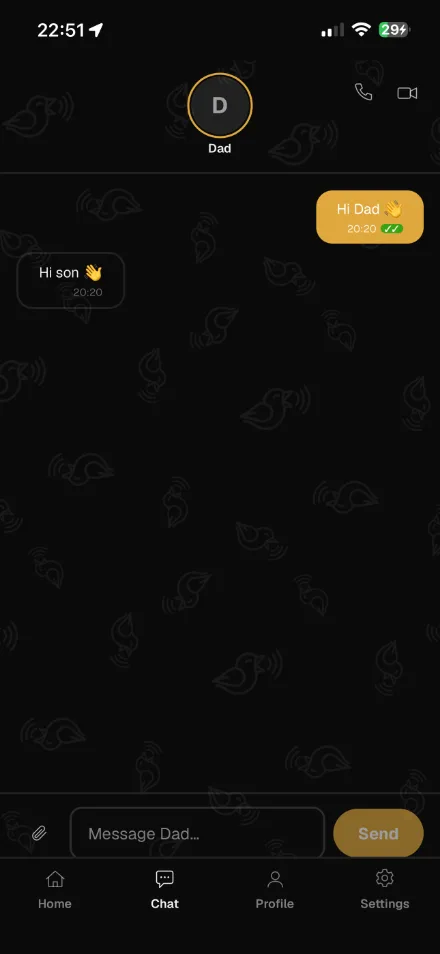
A child can send a one-tap SOS to their parents — and adults can link with their own parent or adult son or daughter, so family can alert each other with live location and see who's coming, with distance and ETA.
Private family chat & calls
Message and call your family privately. Photos and videos are never saved automatically — in ordinary family chat they expire an hour after they're seen, with the option to save a copy in that window.
Co-parenting
One calm thread for separated parents, for the practical things. Nothing sent in it can be edited or deleted by either of you, photos included, and either of you can download the whole conversation whenever you need it.
My Community
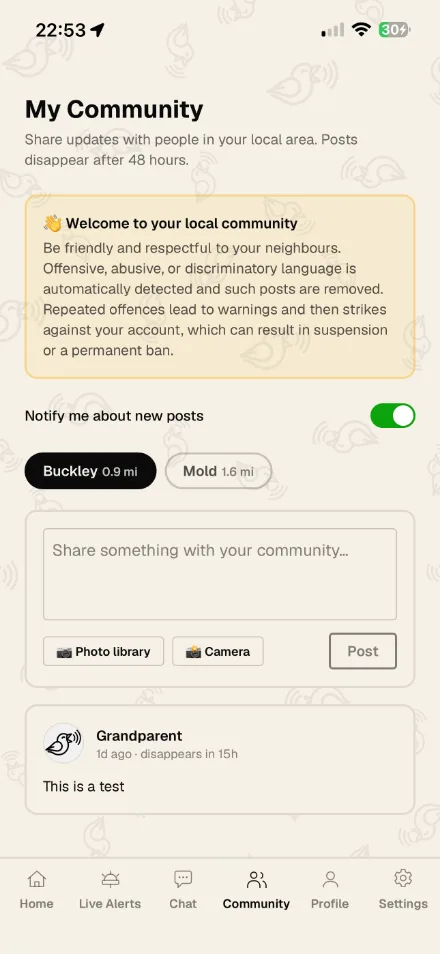
Set your home location and share local updates — with photos — to neighbours in your town. Posts automatically disappear after 48 hours, and everything is automatically moderated to keep it friendly.
Safe places
Save the places that matter — home, school, Nan's — and get a quiet nudge when someone arrives or leaves, with a history you can look back over. Set a time they're expected and you'll be told if they don't turn up.
Get home safe
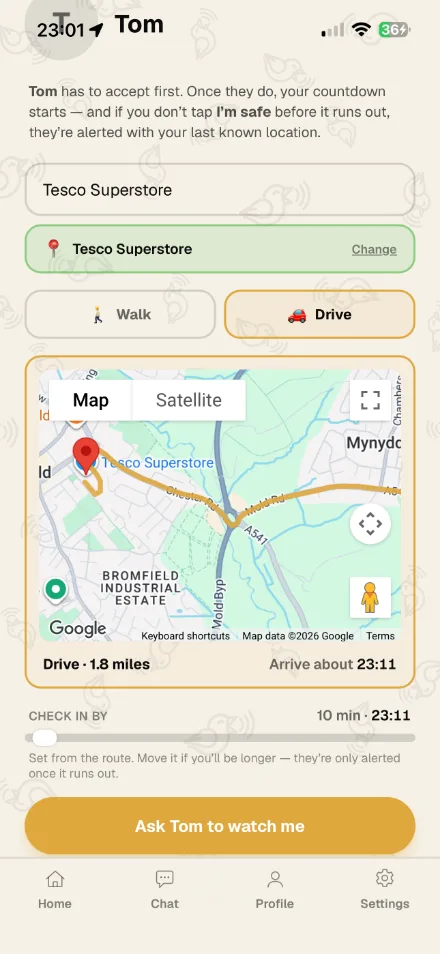
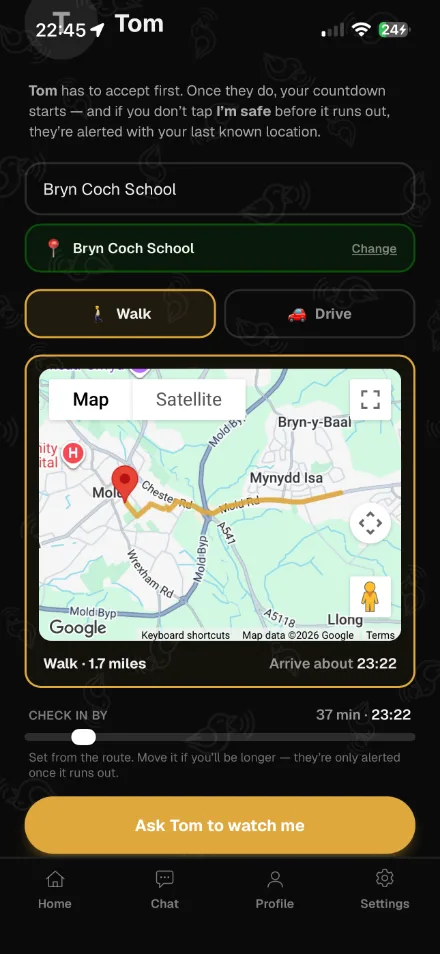
Set a journey time and pick who watches you home. Tap I'm safe when you arrive; if the timer runs out, they're alerted with your last known location. Children choose which linked adult keeps an eye out.
Everyday family life
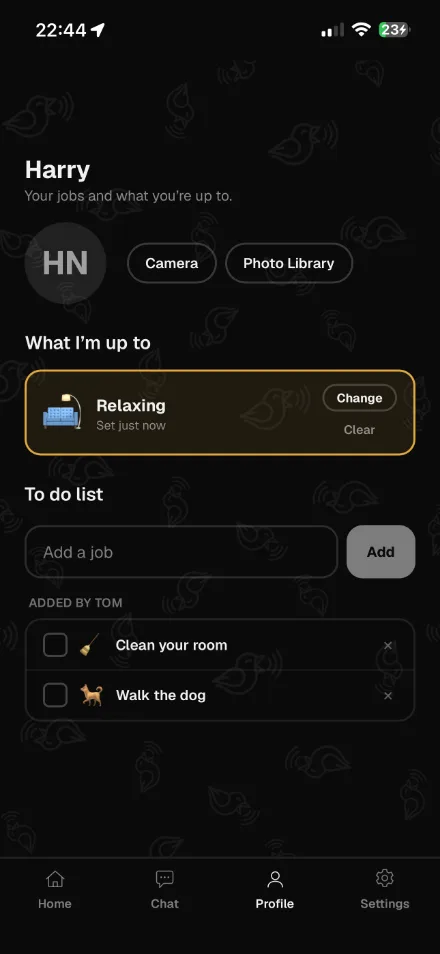
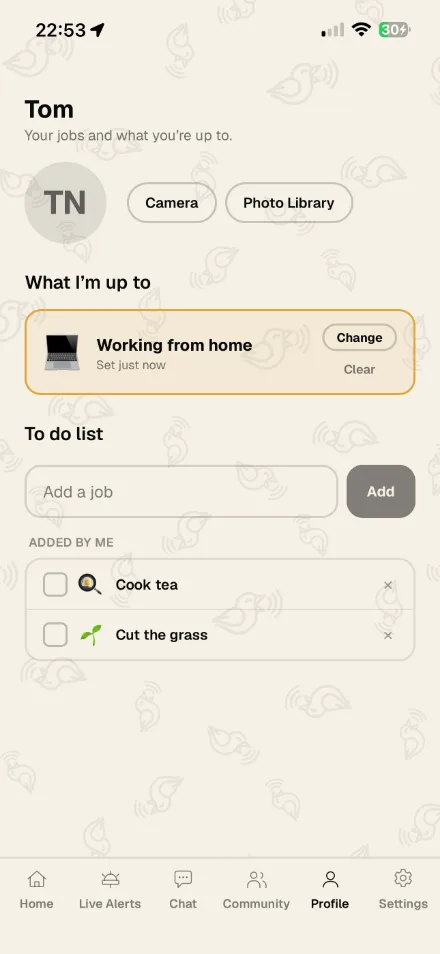
A family calendar with reminders — keep it to yourself, or share it with the people you choose. Shared to-do lists, where parents set jobs for their children and children tick off their own. And a tap to say what you're up to, so family can see you're walking the dog without having to ask.
You stay in control
You decide when to raise an alert, whether to start video, and when to close it. Nothing is shared beyond your family and the people responding — every kind of location sharing is one you switch on, and can switch off.

The only app your child will ever need.
A parent sets up a protected account for their child. The child can send a one-tap SOS to their parents, the parent can check the child's location, and the family gets private chat and calls.
Co-parenting, on the record.
Agreeing pick-ups and swapping weekends should not turn into an argument about who said what. Skuark gives separated parents one calm thread for the practical things — and nothing sent in it can be edited, deleted or unsent by either of you, photos included.
A local noticeboard for the people around you.
Once you set your home location, My Community gives you a local noticeboard for your nearest town. Share updates and photos with the other adults nearby, and see theirs. Posts are only visible to adults in that community, they automatically disappear after 48 hours, and everything is automatically moderated — offensive or abusive language is removed, and repeat offences lead to warnings and then strikes against the account.
Real, checked help — shown as such.
You don't need any approval to respond — every verified member can attend nearby alerts. Professionals who want to stand out apply in the app with evidence of their role; each application is reviewed, and approved Qualified Responders appear with a distinct marker so people know real, checked help is on the way. Once approved, access is free.
Full access, from £1 a month.
Full access for one adult — or pay once and save:
- £10 for a year
- £18 for two years
- £25 for three years
- £50 for lifetime access
Covers you, the children you add, and the adult family you link — your parent, or your adult son or daughter.
- £30 for a year
- £100 for lifetime access
Medical staff, police, fire service, security professionals and first aiders get free access once their role is approved.
Apply to verifyFair questions, straight answers.
No. In an emergency, always call 999 (or your local emergency number) first — and every live alert screen has a one-tap Call button that dials it for you. Skuark sits alongside existing services as a trusted community safety layer, helping bridge the gap between an incident happening and help arriving.
Yes. Every live alert screen has a one-tap Call button that dials your local emergency number — 999 in the UK, 911 in the US, 112 across Europe, and so on, chosen automatically from where you are. The call is placed through your phone's own dialer over the normal network, so it reaches the right control room with your location — and your Skuark alert and livestream keep running in the background.
When something happens, information is often lost in panic, scattered across social media, or shared in group chats with no structure, verification or accountability. Skuark alerts come from verified users, carry a live location, and preserve evidence — structured, responsible and accountable.
Only the people you've chosen, and only for the reason you chose them. During an alert, the verified members responding to it. During a “get home safe” journey or a “keep an eye out” watch, the specific people you picked, until it ends. If you use Safe Places, your device checks its own position against the places you saved so your family can be told you arrived — that's the one feature that works in the background, and deleting your saved places stops it. A child's location is shared with their linked, verified parents, and a grandparent only if a parent switches that on. Location is never used for advertising or profiling.
No. Safe Places doesn't show anyone a live map of where you are. You save the places that matter — home, school, a relative's house — and your family is told when you arrive at one or leave it, and nothing in between. You can set a time someone is expected somewhere, and if no arrival is recorded by then, the people who look after them are told. Arrivals and departures are kept as a history you can look back over. Delete a place and the alerts and history for it stop.
Any verified member within the alert radius — your neighbours as well as any Qualified Responders nearby. Everyone is notified the same way and can choose to attend. Qualified Responders simply appear with a distinct marker, so you know checked, professional help is among those coming.
Yes — and it works both ways. Adults (16+) can invite their own parent to Skuark, and a parent can invite their adult son or daughter; whoever joins first can invite the other. You both keep full accounts and become mutual family contacts: private chat and calls, and a one-tap SOS that shares your live location with each other, but only while an alert is active. There's no silent location tracking between adults.
Yes, when you choose. Once your own parent is on Skuark, you can connect them with your child from your settings — per child, per grandparent. Connecting them enables messaging and voice/video calls. You can additionally choose to allow location sharing or family alerts between them — each is a separate switch, off until you turn it on, and you stay in control.
No — and in a co-parenting thread that goes for photos and videos too. Nothing sent between ex-partners can be edited, deleted or unsent by either of you, and every message carries the time it was delivered and the time it was read. The record also outlives the accounts: if one of you closes your Skuark account, everything else about you is deleted, but the co-parenting thread is kept — otherwise either parent could erase it on their own, which is the whole thing it protects against. It is not kept forever. It is held until your youngest shared child turns 18, plus a year, which is the point at which the family court's interest in those children ends. Two things worth knowing. Everywhere else in Skuark, photos and videos are still deliberately temporary and expire an hour after they are opened — this permanence is specific to co-parenting records. And you can take a copy out whenever you want: Settings has an export that downloads the whole conversation, with the photos and videos, as a file you can keep, print or hand to a solicitor. Downloading it changes nothing — the conversation stays in Skuark, where you can both still see it.
No. Sharing a calendar is a handshake — both people have to switch it on — and an ex-partner is never offered it. There is no setting that opens it, on either side. The one thing that crosses is deliberate, and it is not your calendar. When you tag an event to a child you both look after — a pickup, a dentist appointment, the start of a school holiday — that single event goes to your child and to their other parent, and reminds all of you. Nobody has to be told twice, and nobody has to trust that they were. They see that event and the times on it. They see nothing else you have on, that day or any other. Once it has reached them it stays on the record: you can cancel it, and both of you will see that it was cancelled, but it cannot be quietly removed.
Once you set your home location, My Community gives you a local noticeboard for your nearest town. You can share updates and photos with the other adults nearby, and see theirs. Posts are only visible to adults in that community, they automatically disappear after 48 hours, and everything is automatically moderated — offensive or abusive language is removed, and repeat offences lead to warnings and then strikes against the account.
Yes, but not too often. Your home location sets which local community you're part of, so once you set it, it's locked for 30 days before you can change it again. You can always turn notifications for new community posts on or off.
Members of the public pay £1 per month for full access, and you can cancel at any time — or pay once and save with £10 for a year, £18 for two years, £25 for three years, or £50 for lifetime access. A family membership (£3 per month, £30 for a year, or £100 for lifetime) covers you, the children you add, and the adult family you link — your parent, or your adult son or daughter. Qualified Responders — medical staff, police, fire service, security professionals and first aiders — get free access once their role is approved.
A parent sets up a protected account for their child. The child can send a one-tap SOS to their parents, the parent can check the child's location, and the family gets private chat and calls. Beyond the emergency side, each person has their own page: shared to-do lists — a parent can set jobs for their child, and the child ticks off their own — and a tap to say what they're up to, so you can see they're at football without having to message and ask.
You don't need any approval to respond — every verified member can attend nearby alerts. Professionals who want to stand out apply in the app with evidence of their role; our team reviews each application, and approved Qualified Responders appear with a distinct marker so people know real, checked help is on the way.
The whole app, walked through.
One video, three sides of the same app: on your own, as a parent, and as a child with an account of their own.
Full Walkthrough
Every feature, in the order you would meet them — raising an alert and who it reaches, Safe Places, Get Home Safe, and then the same app as a parent and as a child with an account of their own.
No one should feel alone when something happens nearby. That's Skuark.